Forty clients. Forty statements to build. One person in accounts, a spreadsheet and a coffee going cold.
She copies invoice totals into one tab, payments into another, checks which client paid what, and writes the same polite “just a reminder” email for the eleventh time this week.
Brightline fixes networks for a living. Its own receivables still run on copy and paste.
That’s the gap accounts receivable automation closes. Not by doing anything clever, but by doing the boring parts the same way every time, so a person only steps in when something is actually wrong.
What Is Accounts Receivable Automation?
| Accounts receivable automation is software that handles the repeatable steps between sending an invoice and getting paid: issuing invoices on schedule, sending reminders, recording and matching payments, and building customer statements. Rules trigger each step automatically, and people deal only with exceptions, disputes and judgment calls. |
Think of it as moving from a to do list to an event system. Instead of someone remembering to send a reminder, the due date sends it.
It is not a collections agency, and it does not decide who gets credit. Automated accounts receivable still needs a person setting the rules and handling the conversations a template email can’t.
The pressure behind it is real. In the Federal Reserve Banks’ 2025 Report on Employer Firms, 51% of small employer firms named uneven cash flow as a financial challenge, and the Fed’s 2026 edition defines uneven cash flow to include collecting on receivables.
At a Glance
What it automates: Invoicing, reminders, payment matching and statements.
What stays human: Disputes, credit decisions, final escalation calls.
Where to start: Recurring billing and reminder rules.
What to measure: Days sales outstanding before and after.
Biggest risk: Automating messy data, which just sends wrong messages faster.
The Receivables Event Pipeline
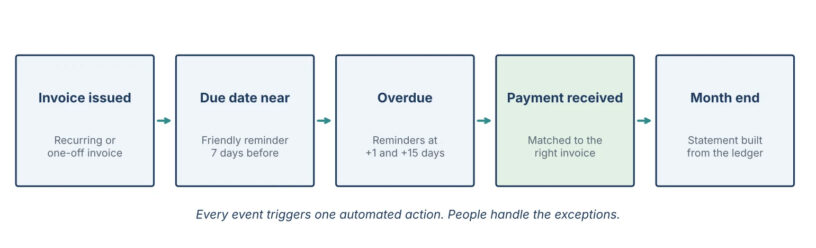
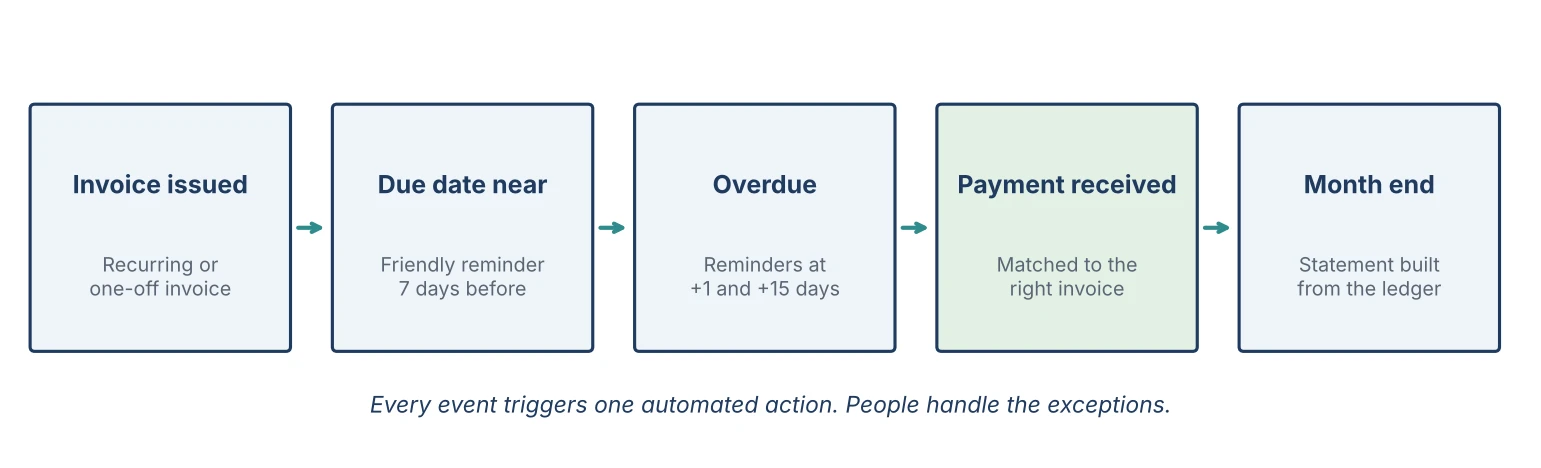
Developers will recognize the pattern. AR automation is an event pipeline: something happens, a rule fires, an action runs.
| Event | Automated action | Where people come in |
|---|---|---|
| Contract renews or month starts | Billing automation issues the month’s invoices | Approving new prices or one-off work |
| Invoice sent | Delivery logged, due date set | Fixing a wrong billing contact |
| Due date 7 days away | Friendly reminder goes out | None |
| Invoice 1 and 15 days overdue | Firmer reminders with a payment link | Reviewing the list weekly |
| Payment arrives | Payment applied to the right invoice | Matching anything ambiguous |
| Month ends | Customer statement generated | Calling the accounts past 30 days |
Invoice automation sits at the start of that chain, and everything after it depends on clean data going in.
Worked Examples
Three accounts receivable examples follow Brightline, a fictional managed IT provider billing 40 clients each month. All numbers are sample data.
Example 1: The Statement as a Data Model
A customer statement is just a query over the ledger. Opening balance, plus invoices, minus payments and credits, equals the closing balance.
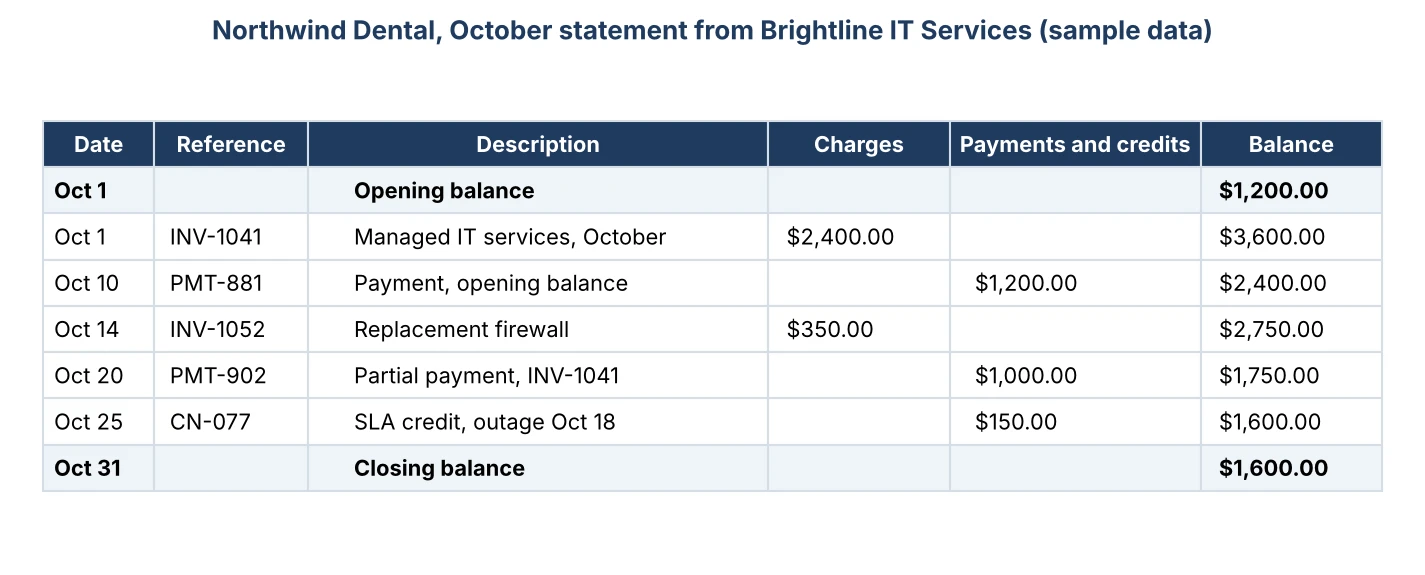
| Opening $1,200 + invoices $2,750, less payments $2,200, less credits $150 = closing $1,600 |
Built by hand, that’s five lookups and a running total someone has to retype. Built by software, it’s generated from transactions that already exist. If you want to see the finished format before automating it, this statement of account example shows the same layout with a running balance.
Example 2: One Invoice Through the Reminder Rules
INV-1041 for $2,400 goes out on October 1, due October 31.
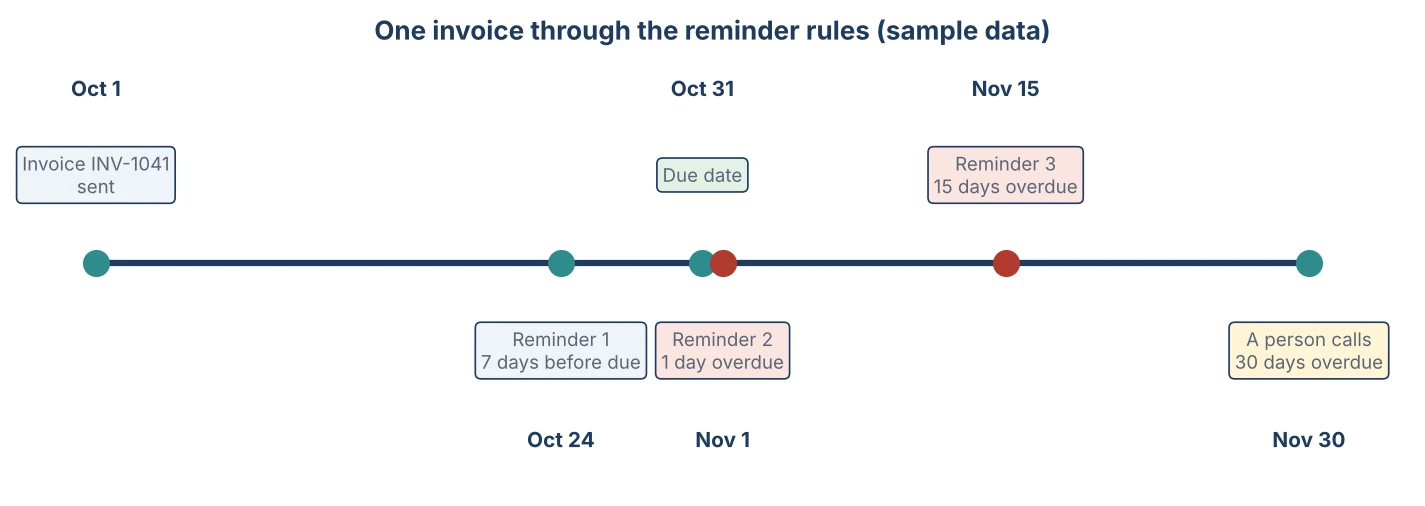
Three emails go out without anyone touching them. A person only picks up the phone on November 30, when the account is 30 days overdue.
Example 3: When Automation Sends the Wrong Message
Northwind Dental pays $1,000 against INV-1041 on October 20. The payment lands, but nobody applies it to the invoice, so it sits as unapplied cash.
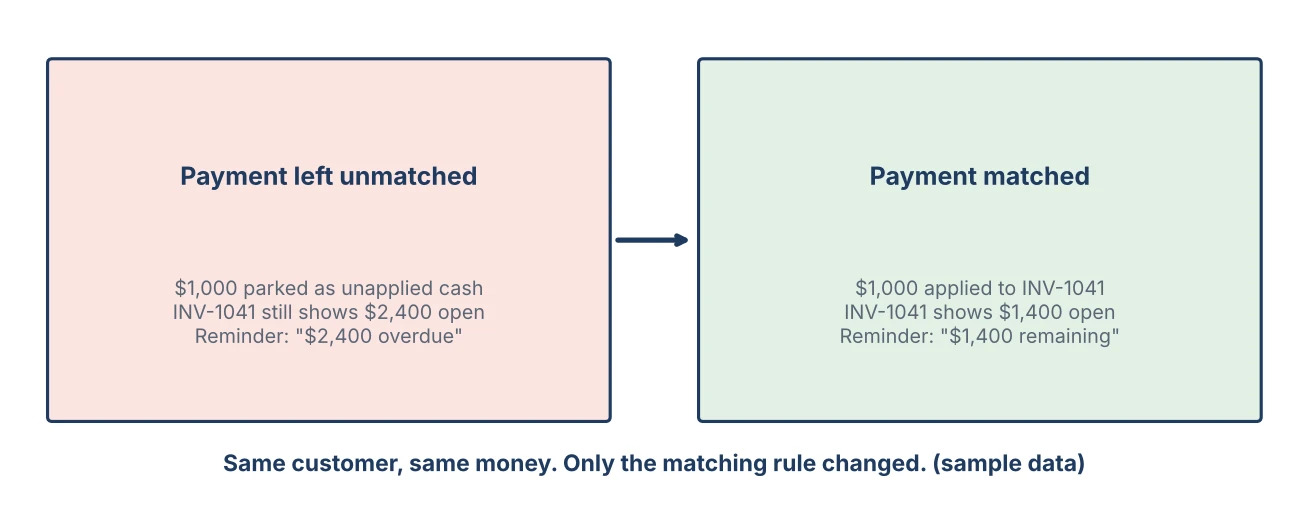
On November 1 the system sees $2,400 still open and sends an overdue reminder for the full amount. To a client who just paid $1,000.
Match the payment to the invoice and the same reminder says $1,400. Same customer, same money, very different phone call.
How to Automate Accounts Receivable
Six steps, in the order most teams take them, without automating your mistakes.
1- Standardize Your Invoice Data
Why: rules only work on consistent fields. Same customer names, same payment terms, one invoice numbering format.
Tip: fix duplicate customer records first. Two “Northwind Dental” accounts means two half statements.
2- Automate Recurring Billing
Why: monthly retainers and subscriptions are the easiest win. Recurring invoices go out on the same day with the same terms, so nobody forgets the quiet clients.
Tip: review price changes before the run date, not after the invoices go out.
3- Set Reminder Rules
Why: a reminder that arrives before the due date gets paid more often than one that arrives after it. Write one payment reminder email per stage: friendly, then factual, then firm.
Tip: put the balance and a payment link in every message. A reminder without a way to pay is just noise.
4- Give Customers a Self Service Portal
Why: a customer self service portal lets clients see open invoices, download statements and pay without emailing you. Good client portal software turns “can you resend that?” into a click.
Tip: send the portal link with the first invoice, not after the first dispute.
5- Capture and Match Incoming Documents
Why: automated invoice processing reads scanned or emailed documents so nobody retypes them. Invoice data extraction pulls the client, line items and taxes into structured fields.
Tip: keep a human review step on anything the system flags as unmatched. In the Federal Reserve Banks’ 2026 Report on Employer Firms, accuracy was the top challenge for small firms using AI, cited by 46% of them.
6- Generate Statements and Measure DSO
Why: statements and days sales outstanding (DSO) tell you whether the automation is working.
Brightline billed $60,000 a month with $90,000 outstanding: a DSO of 45 days. Three months after automating, $66,000 was outstanding: 33 days, with $24,000 back in the bank. That’s DSO reduction you can see on a bank statement, not a dashboard.
Automated vs Manual Receivables
| Task | Manual | Automated |
|---|---|---|
| Monthly retainer invoices | Rebuilt each month | Issued on schedule |
| Reminders | When someone remembers | Fired by due dates |
| Payment matching | Spreadsheet lookups | Applied on receipt, exceptions flagged |
| Customer statements | Built at month end | Generated from the ledger |
| Your time | Spent on routine | Spent on exceptions |
Automation doesn’t collect money. It makes sure nobody forgets to ask for it.
Common Mistakes
| ✗ Automating messy data Why it matters: Duplicate customers and wrong terms produce wrong reminders, faster. The fix: Clean customer records and payment terms first. |
| ✗ No human escalation point Why it matters: Clients who need a conversation just get more emails. The fix: Hand accounts to a person at a fixed point, such as 30 days overdue. Collections automation should stop there. |
| ✗ Leaving partial payments unmatched Why it matters: Paying customers get overdue notices for money they already sent. The fix: Apply every payment to a specific invoice before reminders run. |
| ✗ Reminders with no way to pay Why it matters: Clients have to reply to ask how to pay, and the payment waits. The fix: Include the balance and a payment link in every message. |
What to Look for in Receivables Software
Not every automated invoice system covers the whole pipeline. Before choosing accounts receivable automation software, check that it can:
- Issue repeat invoices on a schedule you control.
- Send reminders before and after due dates, with a payment link.
- Accept partial payments and apply them to specific invoices.
- Give customers a portal for invoices, statements and payments.
- Read incoming documents with a human review step for anything uncertain.
- Show balances, aging and DSO in real time.
How Enerpize Handles Accounts Receivable Automation
So what does that pipeline look like inside one system?
Enerpize is a cloud-based, all-in-one ERP platform for small and medium-sized businesses, combining accounting, inventory, HR, sales, and CRM in a single system. For teams comparing ERP for small business against standalone tools, the receivables side works like this.
Invoicing and Recurring Billing
Invoices can be generated and sent automatically, and repeat invoices run on the dates and intervals you set, with reminders attached.
Reminders and the Client Portal
Automatic due payment reminders go out by email, and clients get a portal where they can approve estimates, pay invoices and pull their own statements.
AI Invoice Processing
Scanned invoices in PDF, image or Excel format can be uploaded, and AI extracts products, taxes and client details for you to confirm. Unmatched items are flagged before anything is saved.
Payments, Balances and Aging
Enerpize accepts partial payments and installment agreements across 135+ currencies and payment methods, and balances, aging and DSO update as each invoice and payment is recorded.
Key Takeaways
- Accounts receivable automation turns invoicing, reminders, matching and statements into rules that fire on events.
- 51% of small employer firms reported uneven cash flow as a challenge in the Fed’s 2025 survey.
- Three reminders, at 7 days before and 1 and 15 days after the due date, covered one invoice with no manual effort.
- One unmatched $1,000 payment turned a correct $1,400 reminder into a wrong $2,400 one.
- Brightline’s DSO fell from 45 to 33 days, freeing $24,000, in this sample case.
- Keep people on disputes, credit decisions and anything flagged as uncertain.
Frequently Asked Questions
What is AR automation?
It is software that runs the repeatable parts of receivables: issuing invoices on schedule, sending reminders, matching payments and generating statements. Rules trigger each step, so people only handle exceptions and conversations.
What parts of receivables can be automated?
Recurring invoicing, reminder emails, payment application, customer statements and reporting. Credit decisions, disputes and final escalation are better left to a person.
Does automation replace a credit controller?
No. It removes routine work so the person spends time on the accounts that need a conversation, such as disputes or long overdue balances.
How do automated payment reminders work?
You set rules tied to the due date, such as one reminder 7 days before and others 1 and 15 days after. The software sends each message on schedule and stops once the invoice is paid.
What is a customer portal for invoices?
A secure page where clients can see open invoices, download statements and pay online, so they don’t need to email you for copies.
How does AR automation software handle partial payments?
A good tool applies the payment to the specific invoice and reminds only for the remaining balance. If payments sit unapplied, reminders quote the wrong amount.
How does automation help reduce DSO?
Invoices go out on time, reminders arrive before the due date, and paying is easier through links and portals. Each cuts days between invoice and cash.
Is AR automation worth it for a small business?
Usually, once you invoice more clients than one person can track comfortably. Start with recurring billing and reminders, then add matching and statements.
Back to the Last Friday
It’s the last Friday of the month again at Brightline.
The statements built themselves on the first of the month. The reminders went out on their own dates. The payment from Northwind Dental landed on the right invoice.
The person in accounts spent the afternoon on three phone calls that actually needed her.
That’s the point of accounts receivable automation. Not fewer people. Better use of the ones you have.
About the Author
Omar El Bahr
Senior Digital Growth Specialist, Enerpize
Omar El Bahr is a Senior Digital Growth Specialist at Enerpize, where he leads SEO, content strategy, and organic growth across international markets. He is a Forbes Communications Council contributor and has written for Entrepreneur on business communication and digital strategy.