Most beginners pick a video editor based on the wrong signal, whichever app looks simplest in a five-minute demo, or whichever one a friend happens to use. That approach works fine for a first video and starts breaking down by the third or fourth, once real editing needs, color, audio, structure, show up and the tool that felt easy suddenly feels limiting.
The better question isn’t “which tool is easiest right now,” it’s “which tool stays approachable as my actual skills and needs grow.” This list is built around that second question.
What actually separates a good beginner editor from a frustrating one
- A gentle start that doesn’t cap out fast, since outgrowing a tool in month two means learning a second one from scratch.
- Genuine, not superficial, simplicity, some tools look simple because features are hidden, not because the workflow is actually easy.
- Real cost transparency, a free tier that quietly requires a paid unlock for anything useful isn’t actually free.
- Room to lean on automation early, since not every beginner wants to master manual editing before producing anything watchable.
The 10 best video editors for beginners at a glance
| # | Tool | Standout Beginner Feature | Cost to Start |
|---|---|---|---|
| 1 | Invideo Editor | AI agents handle assembly while you learn manual editing at your own pace | Free manual timeline |
| 2 | CapCut | Templates produce a polished result on the first try | Free |
| 3 | iMovie | Zero setup, pre-installed on every Mac and iPhone | Free |
| 4 | DaVinci Resolve | The deepest free toolset, worth growing into over time | Free |
| 5 | Filmora | A gentle next step once templates start feeling limiting | Free trial |
| 6 | Clipchamp | Already built into Windows 11 | Free |
| 7 | Veed | Fast, browser-based, nothing to install | Free |
| 8 | Kapwing | Easy to learn together with a friend on the same project | Free |
| 9 | CyberLink PowerDirector | A smooth path from simple cuts into more advanced tools | Free trial |
| 10 | Descript | Editing by deleting text instead of scrubbing a timeline | Free tier |
1. Invideo Editor
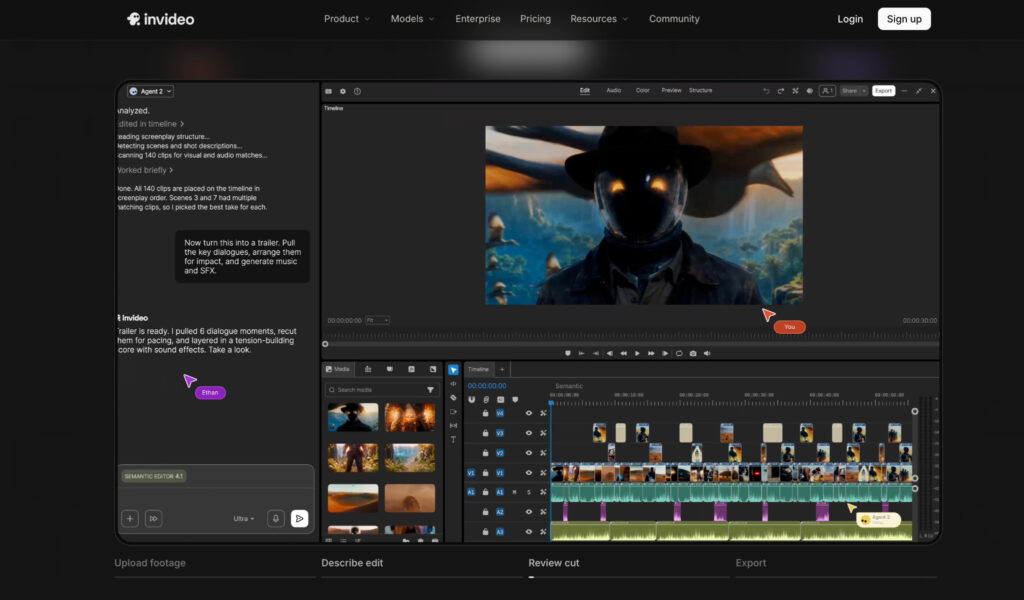
Invideo Editor uses agentic video editing to remove the single biggest barrier for a first-time editor: learning a timeline before producing anything. Upload footage, describe the video you want, and an agent assembles a working cut, picks the cleanest takes, and handles pacing, while the manual timeline sits right there, free to use, for whenever you’re ready to start learning it directly.
Why it’s here: most beginner tools ask you to learn the interface first and get help later. This one lets AI help first, with the interface to grow into whenever you’re ready, on the same project either way. Pricing: manual timeline free to use; in the US, UK, and Japan, paid plans for full agent access run Starter $20/mo through Max 3x $375/mo, billed annually, pricing varies by region.
2. CapCut
CapCut remains the fastest route to something that looks intentional on a first try: pick a trending template, drop in footage, adjust the auto-generated captions, and export, all without touching a manual timeline at any point. The template library updates constantly, so a beginner’s first video can already look current rather than dated.
Why it’s here: genuinely hard to produce a bad-looking result, even on attempt one. Pricing: Free; Pro pricing varies by region and platform.
3. iMovie
For anyone on a Mac or iPhone, iMovie needs no download at all, it’s already sitting on the device, ready to open. Its Magnetic Timeline automatically closes gaps as clips are dragged into place, and Magic Movie can assemble a rough first cut from raw media using a built-in template before a beginner touches anything manually.
Why it’s here: the lowest possible friction to a first edit on Apple hardware. Pricing: Free (Apple devices only).
4. DaVinci Resolve
Resolve looks intimidating on first open, separate pages for cutting, color, and audio, each with its own dense set of controls, but its free version is genuinely one of the most complete toolsets available anywhere, professional color grading and a full audio suite included. A beginner who invests the time learning it rarely finds a reason to switch to something else later.
Why it’s here: the investment pays off longer than almost anything else on this list. Pricing: Free; Studio version ~$295 one-time purchase.
5. Filmora
Filmora sits deliberately between CapCut’s simplicity and Resolve’s depth, with AI assists for background removal and audio cleanup layered onto a genuine, if intermediate, manual timeline. It’s a comfortable second step for a beginner whose first few projects with a purely template-driven tool started feeling too restrictive.
Why it’s here: a natural next tool rather than a jarring jump in complexity. Pricing: Free trial; from ~$49.99/year.
6. Clipchamp
Already sitting inside Windows 11, Clipchamp gives a beginner a genuinely capable free editor with nothing extra to install or set up. Its free tier includes watermark-free 1080p export, not a crippled preview, and its interface stays approachable while still covering trimming, text, and basic transitions.
Why it’s here: zero setup for anyone already on a Windows machine. Pricing: Free (1080p export); Premium ~$11.99/month.
7. Veed
Veed’s browser-based, drag-and-trim timeline needs no prior editing experience at all, and its captioning generates and syncs automatically as soon as footage is uploaded. For a beginner whose first projects are mostly talking-head content, that built-in captioning alone removes a genuinely tedious manual step.
Why it’s here: approachable and fast, especially for short, caption-heavy content. Pricing: Free; paid plans from ~$9/month.
8. Kapwing
For a beginner learning alongside a friend or classmate, Kapwing’s shared browser workspace makes a first collaborative project straightforward, both people editing inside the same timeline at once rather than passing a file back and forth. That real-time collaboration is a genuine convenience most beginner-focused tools don’t offer at all.
Why it’s here: the easiest option here specifically for learning together, not alone. Pricing: Free; paid plans from ~$16/month.
9. CyberLink PowerDirector
PowerDirector lets a beginner start with simple cuts, transitions, and titles, then grow into motion tracking, multi-key chroma removal, and more advanced tools without the tool ever feeling like a wall it suddenly hits. Its AI features, scene detection, speech cleanup, are varied enough that a beginner rarely feels short-changed compared to pricier options.
Why it’s here: a smoother growth curve than most tools at this price point. Pricing: 365 subscription ~$60-70/year; one-time purchases from $99.99.
10. Descript
For anyone whose first projects are mostly talking, an interview, a tutorial, a vlog, Descript turns editing into deleting text from a transcript instead of scrubbing a timeline looking for the right moment. Overdub can also fix a flubbed line by retyping it, a genuinely useful shortcut for a beginner who doesn’t want to re-record a whole take over one mistake.
Why it’s here: a genuinely different, often easier way in for dialogue-heavy first projects specifically. Pricing: Free tier available; Hobbyist ~16/month,Creator~24/month.
Which one should a beginner actually start with?
- Want AI to handle the hard parts while you learn at your own pace? Invideo Editor.
- Want the fastest possible first video for social content? CapCut.
- On a Mac and want zero setup? iMovie.
- Willing to invest time for the deepest free toolset? DaVinci Resolve.
- Your first project is mostly you talking to a camera? Descript.
The bottom line
The editor that feels easiest in a five-minute demo isn’t always the one that stays easy once real editing needs show up. The tools that hold up longest either keep genuine depth in reserve for later, or actively remove the hardest parts of the job rather than just hiding them behind a simple interface.
If the goal is starting immediately with AI handling the hardest early decisions, while keeping a real editor to grow into on the same project, Invideo Editor is built specifically around that.
Frequently Asked Questions
What’s actually the best video editor for someone who’s never edited before?
Invideo Editor is a strong starting point since AI agents can handle assembly and editing while a beginner learns manual editing at their own pace. CapCut and iMovie are also excellent for the fastest possible first video, with less long-term depth to grow into.
Should a beginner start with a free tool or pay for something better right away?
Start free. The manual timeline on Invideo Editor, CapCut, iMovie, DaVinci Resolve, and Clipchamp are all genuinely capable at no cost, more than enough to learn on before considering any paid upgrade.
Is it better to start simple and switch tools later, or start with a tool that has more room to grow?
Starting with room to grow saves real time. Switching tools after outgrowing a simple one means relearning an interface from scratch instead of just unlocking more depth in the one you already know.
Does a beginner need a powerful computer to get started?
No, for most tools on this list. Invideo Editor, CapCut, Veed, and Kapwing all run in the browser without heavy hardware requirements. DaVinci Resolve is the main exception, benefiting from stronger hardware as projects get more demanding.











Leave a Reply