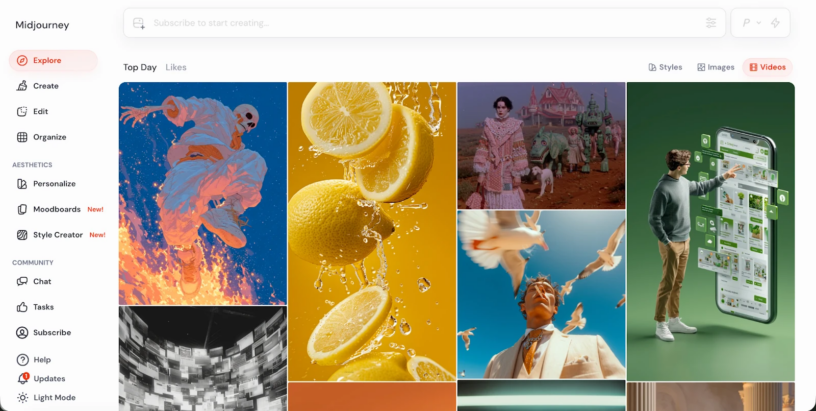
If you want to try Midjourney AI on Videoinu without paying first, there is a simple way to start. Videoinu gives new users free credits, and its Midjourney workflow is built around turning Midjourney-style images into animated videos while keeping the original look, color balance, and artistic feel.
That approach makes sense because Midjourney is still best known for strong image creation, even though Midjourney now also offers video features. Midjourney’s own docs describe video as turning a single image into a dynamic 5-second clip, and the general getting-started guide points users from image creation into video creation.
On Videoinu, the focus is less on generating Midjourney images from scratch and more on animating Midjourney-style visuals into short videos.
What Midjourney AI Is Good For on Videoinu
Midjourney works best when the visual style matters. Videoinu’s Midjourney page emphasizes preserving artistic identity, color harmony, and image detail across frames, which makes it a strong fit for fantasy visuals, concept art, stylized portraits, and other image-led scenes.
In practice, that means this workflow is most useful when you already have a strong image and want to add motion without losing the original aesthetic. That is also why it works well for creators buildinga faceless video workflow for YouTube or social content: the visual identity can carry the video even when no one is on camera. Videoinu’s faceless video tool is built around exactly that kind of creation style.
How to Use Midjourney AI on Videoinu
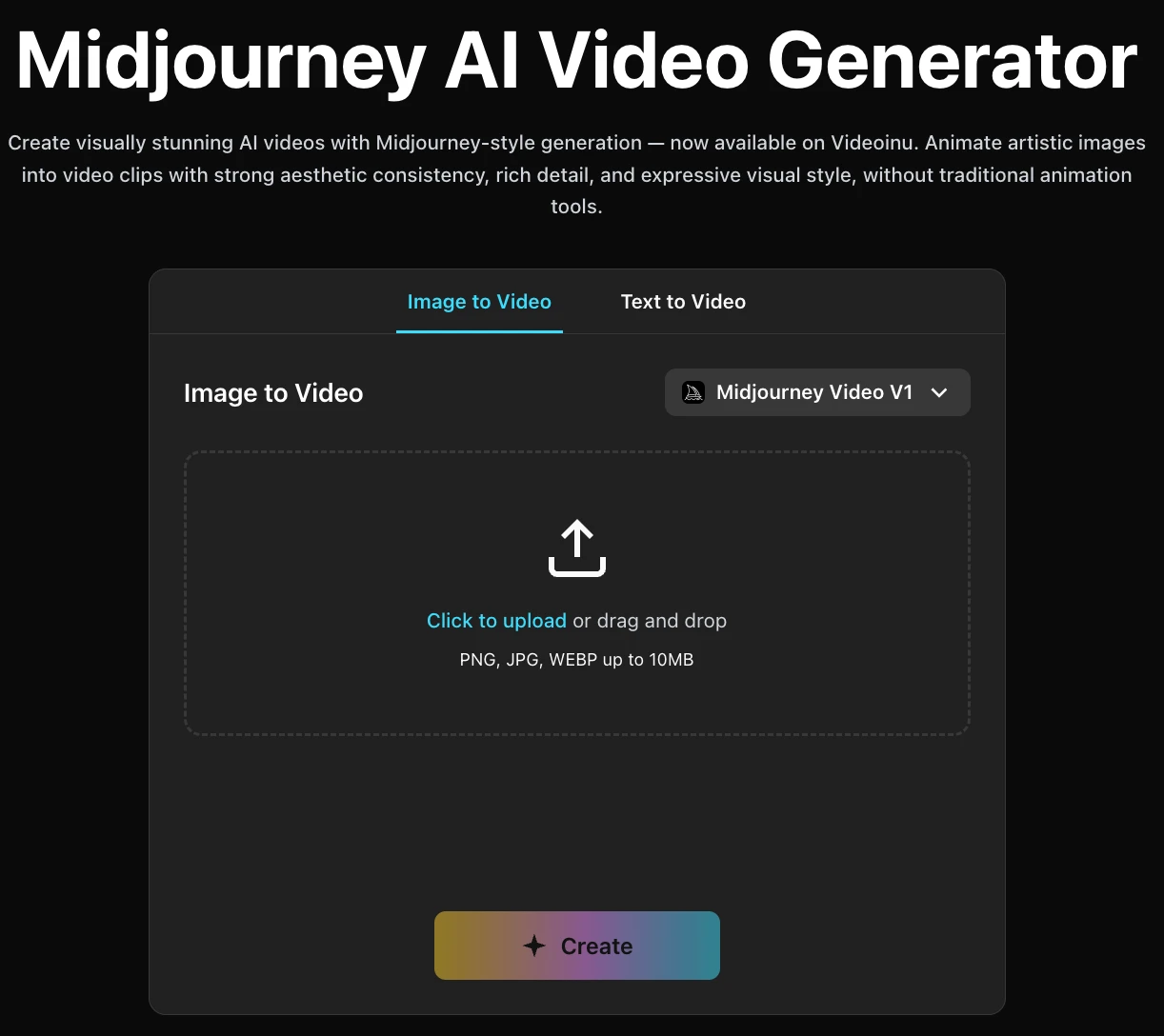
Step 1: Sign Up for Videoinu
Start by creating a Videoinu account. The platform offers a free starting path for new users, so you can try the workflow before deciding whether to keep going. Videoinu also positions itself as a broader AI video platform for building longer, story-friendly content, not just one-off clips.
Step 2: Start with a Strong Midjourney Image
This is the most important part. The Midjourney workflow on Videoinu is centered on turning Midjourney-style images into video, so it works best when your source image already has a strong look. Videoinu’s Midjourney page specifically frames the process around preserving that original aesthetic while adding motion.
A good source image usually has one clear subject, a readable background, and a style worth preserving. If the image already feels finished as art, it usually becomes a better short video too. That is an inference from Videoinu’s emphasis on artistic consistency.
Step 3: Open the Image-to-Video Tool
Once your image is ready, move into Videoinu’s image-to-video workflow. That tool is designed for animating still images with motion and transitions, and it is the most natural way to work with Midjourney-style visuals on the platform. Videoinu’s image-to-video generator accepts JPG, PNG, and WEBP files, with an optional prompt field and short-clip settings.
This is a better fit than rebuilding the whole scene from text, because the visual identity is already in the image. Your goal here is to make it move, not replace it.
Step 4: Add Motion, Not a Whole New Scene
When you add prompt guidance, keep it focused on motion or camera feel instead of rewriting the image.
For example:
A slow camera push-in while the character’s hair moves in the wind.
This kind of instruction works better because the image already contains the subject, style, and setting. The prompt only needs to guide what changes over time. That approach matches how both Midjourney video and Videoinu image-to-video are described: start from an image, then animate it.
Step 5: Generate, Review, and Improve
Generate the clip and treat the first version like a draft. Watch it and ask whether the motion feels natural, whether the original style still holds up, and whether the clip feels like an animation of the image rather than a different scene entirely.
If the result is close but not right, change one thing at a time. A smaller motion change, a cleaner source image, or a tighter camera instruction usually helps more than rewriting everything. That is an inference from the image-first workflows described by Midjourney and Videoinu.
Why Videoinu Is a Good Place to Try Midjourney AI
One reason is that the workflow is straightforward. Videoinu already has a dedicated path for animating still images, and its Midjourney page is aligned with that use case. Instead of forcing Midjourney into a generic video process, Videoinu focuses on the most natural bridge: turning strong Midjourney-style images into short animated videos.
Another reason is that Videoinu supports broader creator workflows beyond one clip. The platform also includes faceless video, text-to-video, and longer storytelling features, so a Midjourney-style animated shot can become part of a larger content pipeline later.
Tips for Better Midjourney AI Results on Videoinu
Start with the image, not the prompt. Midjourney’s strength is visual identity, and Videoinu’s Midjourney workflow is built around preserving that style in motion.
Use motion prompts, not scene prompts. The more you try to redefine the whole image, the easier it is to lose the original look you wanted to keep. This is an inference supported by Videoinu’s image-to-video design and Midjourney’s image-first video flow.
Think in short clips first. Midjourney’s current video docs describe a 5-second video from a single image, and Videoinu’s image-to-video interface is also built around short outputs.
Final Thoughts
The easiest way to get started with Midjourney AI on Videoinu for free is to sign up, use the free starting credits, bring in a strong Midjourney-style image, and animate it through the image-to-video workflow. If your goal is to preserve artistic style while adding motion, this is one of the most natural ways to do it.
FAQs
Can I use Midjourney AI on Videoinu for free?
Yes. Videoinu offers a free starting path for new users, which lets you try the creation workflow before upgrading.
Is Midjourney mainly an image tool or a video tool?
Midjourney is still widely known for image generation, but its docs now also cover video creation from a single image.
What is the best way to use Midjourney on Videoinu?
The most natural approach is to start with a strong Midjourney-style image and animate it through Videoinu’s image-to-video workflow.
Is this good for faceless content?
Yes. Midjourney-style visuals can work well in a faceless format, especially when strong art direction matters more than on-camera presence. Videoinu also provides a dedicated faceless video tool for that style of creation.
Do I need video editing experience?
Not much. Midjourney video starts from an image, and Videoinu’s image-to-video workflow is built to animate still images automatically.









Leave a Reply