When people talk about IT security, the conversation usually turns to passwords, firewalls, phishing, ransomware, and endpoint protection. There is another side to the problem that is much easier to overlook: someone can simply get too close to the equipment.
An unlocked network closet, an unattended server room, a propped-open side entrance, or even a stolen employee badge can create problems that software alone cannot solve. These are physical security threats that deserve attention alongside digital risks.
Physical security is the collection of safeguards used to protect buildings, people, equipment, and other tangible assets. For an IT team, that can mean anything from controlling access to a server room to receiving an alert when temperatures around critical hardware rise unexpectedly.
There is no single piece of equipment that handles all of this. Good physical security works in layers. Here are 10 examples that show what that looks like in practice.
1. Electronic access control
A lock and key still have their place, but they become cumbersome when dozens or hundreds of people need different levels of access.
Electronic access control makes those permissions easier to manage.
An employee might use a badge to enter the office but be denied access to the server room. Members of the infrastructure team could have access to both. A contractor might receive temporary access that expires at the end of the day.
That is much easier to manage than collecting keys or changing locks every time someone’s responsibilities change.
Access records can also help investigate an incident. If equipment disappears from a restricted room, administrators may be able to determine which credentials were used around the time it happened.
2. IP security cameras
Cameras are among the most recognizable physical security tools, but their usefulness goes well beyond recording a break-in.
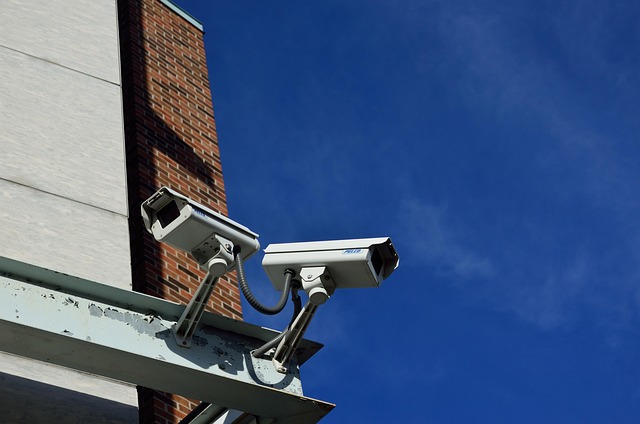
IP security cameras can monitor entrances, hallways, loading docks, parking areas, server rooms, and other sensitive locations over the organization’s network. Depending on the system, authorized personnel may also be able to view footage remotely.
Where cameras become particularly useful is when they provide context for another security event.
Suppose an access system records several failed attempts to enter a network room late at night. A nearby camera can help determine whether someone accidentally used the wrong badge or whether the event deserves immediate attention.
Placement matters. A large number of poorly positioned cameras can still leave important security blind spots.
3. Intrusion sensors and alarms
Cameras are useful when somebody is watching them or reviewing footage. Intrusion detection sensors can provide a more immediate warning that something has changed.
Common examples include door contacts, motion detectors, glass-break sensors, and window sensors.
A door contact on a communications room, for instance, can trigger an alert if the door opens outside approved hours. Motion detection can provide another layer of coverage in areas that should normally be empty overnight.
These physical security examples illustrate an important point for IT teams: different threats call for different controls. A motion sensor, camera, badge reader, and reinforced door do different jobs, and their value increases when they are deployed as complementary layers.
This is usually more effective than buying technology first and deciding what to do with it later.
4. Fences, gates, bollards, and other barriers
Not every effective security measure needs software.
A fence establishes a boundary. A controlled gate limits vehicle access. A bollard can prevent vehicles from getting too close to an entrance or piece of infrastructure. Reinforced doors make sensitive areas harder to enter.
The value of these measures is often the extra time they create.
Think about a data center with several layers between the street and the servers. Someone may need to pass a property boundary, a controlled building entrance, an employee-only area, and finally a restricted equipment room.
An intruder has to defeat several security controls rather than one.
That gives the organization more opportunities to notice that something is wrong.
5. Security lighting
Lighting sounds almost too simple to belong on a list of modern security controls. In practice, it supports several of them.
Dark loading areas, parking lots, side entrances, and equipment enclosures can make suspicious activity harder for people and cameras to see. Poor visibility can therefore increase exposure to physical security threats, particularly around areas that receive little attention after normal business hours.
Appropriate security lighting improves visibility and can make an area less attractive to someone trying to remain unnoticed.
It also affects camera performance. Installing a camera without considering nighttime lighting may result in footage that looks fine during the day but provides little useful detail after dark.
For outdoor surveillance projects, lighting and camera placement should be evaluated together.
6. Secured server rooms and network closets
The server room is an obvious place to restrict access. The forgotten network closet at the other end of the building may be just as important.
These spaces can contain switches, routers, patch panels, storage equipment, cabling, and other critical IT infrastructure that keeps the business connected.
Leaving one unsecured could allow someone to unplug equipment, connect an unauthorized device, interfere with cabling, or simply walk away with hardware. Theft and unauthorized access are obvious concerns, but physical security threats can also include deliberate equipment damage or tampering that disrupts network availability.
Protection does not have to be complicated. Depending on the risk, it might include controlled door access, a camera, locked racks, door-open alerts, or restrictions on who can enter.
IT teams should map where critical equipment actually lives throughout the building. It is surprisingly easy to protect the main equipment room while overlooking smaller network closets.
7. Visitor management
Most workplaces regularly admit people who are not employees.
Delivery drivers arrive. Contractors repair equipment. Vendors attend meetings. Candidates come for interviews. None of those situations automatically creates a security problem, but visitors should not have the same freedom of movement as employees.
A visitor management process can be as simple as checking in at reception and receiving a temporary badge. More controlled facilities may verify identification, notify the employee hosting the visitor, issue time-limited credentials, and require escorts in restricted areas.
The important part is knowing who is in the building and where that person is allowed to go.
Temporary access should also be temporary in reality. Credentials issued for a one-day job should not continue working weeks later.
8. Environmental monitoring
Sometimes the biggest threat to IT equipment is not a person at all.
A leaking pipe above a network room can cause serious damage. So can excessive heat after an air-conditioning failure. Smoke, unusual humidity, water, and power problems can also threaten equipment or availability.
Environmental monitoring sensors can watch for these conditions when nobody is physically present.
Consider a cooling system that fails at 2 a.m. If there is no environmental monitoring, the first sign of trouble might be servers shutting down several hours later. A temperature alert gives someone a chance to respond before the room reaches dangerous conditions.
This is an important reminder that physical security threats are not limited to intruders or theft. Environmental events can cause just as much disruption to critical IT systems.
9. Security zones
Not every part of a workplace needs the same level of protection.
A lobby is designed to receive visitors. A normal office area is primarily for employees. A server room is different again.
Dividing the building into physical security zones makes those differences explicit.
A simple arrangement could be:
Public area → reception → employee workspace → restricted room → high-security area
Access becomes progressively tighter as someone moves deeper into the facility.
IT professionals will recognize the logic. It resembles the principle of least privilege used in digital security: give people the access they need to do their jobs, rather than access to everything.
The same idea works surprisingly well for physical spaces.
10. Connected security systems
Access control, cameras, alarms, and sensors are useful individually. They become more informative when security events can be viewed together.
Imagine that somebody tries an invalid credential at a server-room door. Instead of receiving an isolated access-control notification, a security team could also view the camera covering that entrance and determine what is happening.
That context can make incident response faster.
Integration does introduce an important IT consideration, though. A network-connected camera or access controller is still a network-connected device.
These devices need sensible administration just like other endpoints. That includes strong credentials, controlled permissions, network segmentation, software updates, and an accurate device inventory.
Physical security technology should not quietly create a new cybersecurity weakness.
Choosing physical security controls based on the actual risk
It is easy to turn physical security into a shopping list. More cameras. More sensors. More badges. More alarms.
That is backwards.
Start with the assets and the ways something could realistically go wrong.
Where is critical equipment located? Who needs to reach it? Could someone enter through an overlooked door? Would the team know if a network closet were opened at midnight? What happens if the server room gets too hot? How quickly could somebody investigate an alert?
These questions help turn a broad list of physical security threats into specific risks that can actually be addressed.
A small software company and a large data center will answer those questions very differently.
The software company might decide that controlled building access, a secured network closet, a few well-placed cameras, and a visitor process cover its major risks. The data center will probably need several more layers.
The right setup is the one where every security control has a reason to exist.
Why physical protection belongs in the IT security conversation
Digital systems ultimately depend on physical things: servers, switches, cables, endpoints, power systems, and the rooms that contain them.
Protecting those assets takes more than a locked front door.
Access controls determine who can enter. Cameras and sensors help teams notice unusual activity. Physical barriers make sensitive areas harder to reach. Environmental monitoring protects equipment from conditions that may have nothing to do with an intruder. Security zones prevent someone who belongs in one part of a building from automatically gaining access to every other part.
For IT teams, the practical starting point is to walk through the facility and look at it as critically as they would a network. Identify the most relevant physical security threats, consider how critical assets could be reached or disrupted, and then put the appropriate layers between those assets and the risks they face.