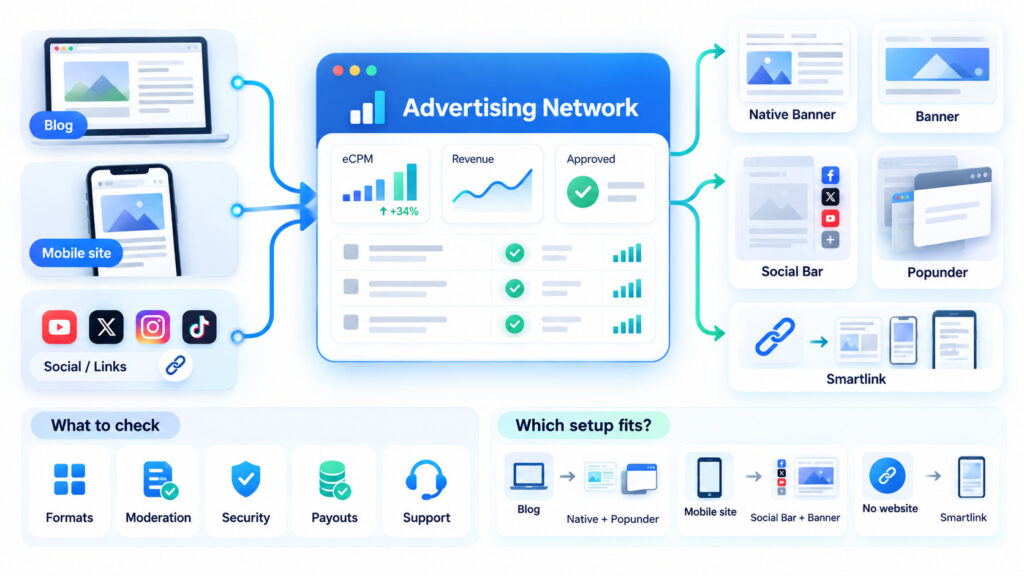
Think of a website advertising network as a matchmaker with a dashboard. Brands arrive with budgets, site owners arrive with readers, and the network pairs them up. For a publisher, the practical question isn’t whether to join one but which one suits the pages you actually have. A good website advertising network lets you start with a single ad code and grow the setup as your traffic grows.
How the matchmaking works
You register as a publisher, add your site, and place a short ad code. From then on, the network fills your ad placements with ads from advertisers, so there’s no need to negotiate deals individually. In your account, you can track eCPM, which shows how much revenue your traffic generates per 1,000 ad impressions. Rates vary depending on traffic quality, GEO, ad format, and advertiser demand. Traffic that performs well for advertisers may generate higher eCPM.
Formats you can run
Most networks offer several ad units, and they can share a page. Choosing between them mostly comes down to how much room your layout has.
Formats that sit on the page
Native Banners are the most flexible: you decide the block size, colors, and font sizes, so the unit looks like part of the article. Standard Banners come in sizes such as 300×250, 728×90, and 320×50 for mobile. Social Bar shows notification-style units and widgets, and it suits publishers who send mostly mobile traffic.
Formats that need no page space
Popunder opens in a new tab or window and doesn’t take any room on your page, so it can run alongside any other unit. Smartlink goes further: it’s a single link, available only to publishers, that you can attach to text, a button, or an image. Smartlink can be added to website content, buttons, and supported traffic sources outside traditional websites, making it useful for publishers who don’t rely on a single site.
Five checks before you sign up
Before registering anywhere, look at how the network handles these:
- Variety of formats, so you can test what fits your layout
- Moderation speed and how clearly the requirements are explained
- A security system that screens out bot traffic and fraud
- Payout schedule, minimum balance, and available payment methods
- Support that helps with placement and optimization, not just account questions
Matching formats to the kind of site you run makes the first month easier:
| Site type | Good starting combination | Why it works |
| Blog with long articles | Native Banners plus Popunder | Ads blend into text, and Popunder needs no space |
| Mobile-heavy content site | Social Bar plus Banner 320×50 | Both are built for small screens |
| Social account, no website | Smartlink | One link, no code to place |
What publishers report
Adsterra works with more than 45,000 publishers and processes payouts twice a month. Minimum payouts start at $5 for eligible payment methods, while others have higher thresholds. Its Partner Care team also advises on monetization, which helps when the first placements don’t hit the right spot. Some publishers report daily earnings of $50 to $800 or more, although actual results can be lower or higher depending on traffic volume, quality, GEO, and ad format.
FAQ
What does a website advertising network do for publishers?
It connects your site to advertisers, supplies the ad code, and reports your earnings in one account, so you don’t negotiate deals one by one.
Do I need a website to use one?
Not always. Smartlink can be placed in text, buttons, or images wherever your audience already is, including social traffic.
Can I run several formats at once?
Yes. Popunder needs no space on the page, so it combines with banners, Native Banners, or Social Bar.