
Your firewall is the first line of defense between your network and the internet. But what happens when that firewall stops receiving security patches? For thousands of organizations running older FortiGate hardware, this is not a hypothetical — it is the current reality. In early 2025, a threat actor known as “Belsen Group” published stolen configuration data from approximately 15,000 FortiGate devices on the dark web, exposing IP addresses, credentials, and firewall rules. The source: unpatched vulnerabilities on devices that, in many cases, had already reached end of life. Understanding the FortiGate end-of-life lifecycle is not a procurement concern — it is a security imperative.
What FortiGate EOL actually means
Fortinet uses a structured lifecycle framework with several distinct milestones, and conflating them is a common and costly mistake. Each milestone has different operational implications:
- End of Order (EOO) is the last date a FortiGate model can be purchased as new hardware. Fortinet provides a minimum of 90 days advance notice before EOO. Once this date passes, the product is no longer commercially available, but existing units continue to receive support.
- Last Service Extension Date (LSED) is perhaps the most overlooked milestone. It is the final deadline to renew or purchase support contract extensions for a discontinued product — occurring 12 months before the End of Support date. Once LSED passes, organizations can no longer extend contracts at any price, even if the device still has a year of official support remaining. Missing LSED locks organizations out of support for the remaining lifecycle period.
- End of Engineering Support (EOES) applies primarily to FortiOS software versions. After EOES, Fortinet stops developing new features and fixing regular bugs. The software enters a “must-fix” phase in which only critical PSIRT security vulnerabilities receive patches, for an additional 18 months. EOES typically occurs 36 months after the software’s General Availability (GA) date.
- End of Support (EOS) is the final milestone. After EOS, Fortinet provides no support of any kind: no TAC tickets, no RMA hardware replacements, no bug fixes, no security patches. For hardware, EOS typically occurs 60 months (five years) after EOO. For FortiOS software, EOS occurs approximately 54 months after GA.
- EOSL (End of Service Life) is terminology used by third-party vendors to describe the combined hardware and software end of all support — effectively equivalent to Fortinet’s EOS milestone.
For a consolidated reference on tracking these dates across affected models, FortiGate EOL resources can help organizations map their inventory against official Fortinet lifecycle milestones.
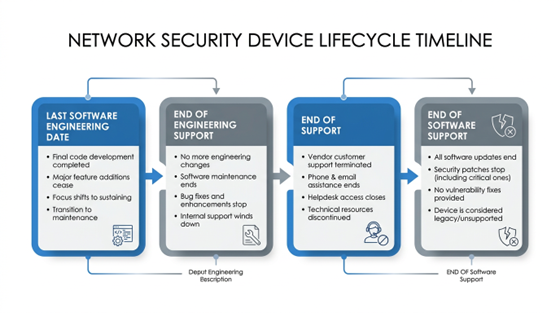
FortiGate EOL Lifecycle Timeline
Which FortiGate models are reaching EOL
The D-series and E-series hardware families are currently at the center of the EOL wave affecting enterprise networks.
D-series models already past EOS:
- FortiGate-60D: EOS September 23, 2023
- FortiGate-80D: EOS April 16, 2023
- FortiGate-90D: EOS October 14, 2023
- FortiGate-300D: EOS October 11, 2023
- FortiGate-140E and FortiGate-91E: EOS reached in 2024
E-series and other models with recent or upcoming milestones:
- FortiGate-90E: EOS April 2025
- FortiGate-1500D: EOS April 2025
- FortiGate-240D: EOS July 2025
- FortiGate-100E: LSED August 17, 2025 — EOS August 17, 2026
- FortiGate-80E: LSED approximately August 2025 — EOS approximately August 2026
- FortiGate-30E: LSED March 31, 2026 — EOS March 31, 2027
- Broader E-series (50E, 60E, 80E, 100E, 300E, 500E): LSED window July through November 2025
A particularly important case is the FortiGate 30E. Although its EOS date is March 2027, it is hardware-capped at FortiOS 6.2.x and cannot be upgraded to any 7.x firmware. FortiOS 6.2 reached full End of Support in approximately September 2023. This means the 30E is running fully unsupported firmware — with no security patches available — despite not yet being officially end-of-life at the hardware level. It represents a dangerous false sense of security.
On the software side, FortiOS 7.2 — one of the most widely deployed versions — passed End of Engineering Support on March 31, 2025. Devices running 7.2 no longer receive bug fixes. FortiOS 7.0 reached full End of Support in September 2025 with no patches of any kind available. Organizations still running either version are exposed.
The current-generation F-series (40F, 60F, 80F, 100F, 200F) and the newer G-series (40G, 60G, 80G) have no announced EOL dates as of early 2026 and represent the standard replacement targets.
Security risks of running EOL FortiGate hardware
The consequences of operating EOL FortiGate hardware are not theoretical. The 2024–2025 period produced some of the most actively exploited Fortinet vulnerabilities on record:
- CVE-2024-21762 (CVSS 9.8 — Critical) is an out-of-bounds write vulnerability in FortiOS that allows unauthenticated remote code execution via HTTP requests. It was actively exploited by threat actors including suspected state-sponsored groups. A compromised FortiGate effectively means complete loss of network perimeter control.
- CVE-2024-23113 (Critical — Format String RCE) was added by CISA to its Known Exploited Vulnerabilities catalog. As of October 2024, the Shadowserver Foundation identified over 87,000 internet-facing Fortinet devices still vulnerable to this flaw — allowing unauthenticated remote code and command execution.
- CVE-2024-55591 (CVSS 9.6 — Authentication Bypass Zero-Day) was disclosed in January 2025 but had been exploited in the wild since November 2024. It allows attackers to escalate privileges to super-admin level without authentication. The Mora_001 ransomware group — linked to LockBit — exploited this vulnerability to create rogue admin accounts, establish VPN tunnels, modify firewall policies, and move laterally across victim networks. A companion flaw, CVE-2025-24472, was exploited alongside it in early 2025 campaigns.
For organizations on EOL hardware or firmware, none of these patches are available. CISA has added multiple FortiOS vulnerabilities to its Known Exploited Vulnerabilities catalog, and the expectation that attackers will discover and exploit new flaws in unpatched devices is well-founded.
Beyond direct compromise, compliance exposure is substantial. Running unsupported network security hardware typically conflicts with:
- PCI-DSS requirements for current security controls
- HIPAA technical safeguard requirements
- NIST SP 800-53 patch management controls
- SOC 2 operational security criteria
- ISO 27001 asset management and vulnerability management clauses
Auditors and regulatory bodies are increasingly flagging EOL network equipment during assessments. The combination of technical risk and compliance liability makes delayed action an increasingly difficult position to justify.
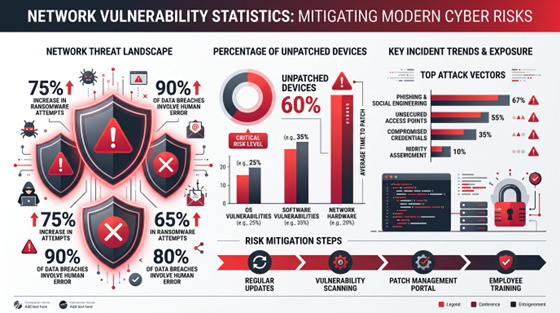
FortiGate Security Risks
Planning your FortiGate EOL migration
A structured migration approach reduces both risk and cost. The following six-step process addresses the full scope of a FortiGate refresh:
- Audit your inventory. Document every FortiGate model and firmware version in your environment. Cross-reference against the Fortinet Product Life Cycle page at support.fortinet.com (a free FortiCloud account is required). Third-party references such as endoflife.date/fortios and Park Place Technologies’ EOL lists provide quick lookup without an account. Flag any device meeting one or more of these criteria: past EOS date, running a FortiOS version past EOES, or with LSED within the next 12 months.
- Prioritize by risk. Internet-facing devices on EOL hardware or firmware represent the highest attack surface and should be addressed first. Devices managing sensitive network segments — finance, HR, PCI-scoped environments — are next. Internal segmentation firewalls with no direct external exposure can follow. FortiGate devices sit at the perimeter; a compromise affects everything behind them.
- Act on LSED deadlines immediately. If any device’s LSED is approaching, renew support contracts before that date. Missing the LSED deadline means support cannot be extended at any price, eliminating the option to maintain coverage through the migration window.
- Plan the firmware migration path. Target firmware for new or refreshed hardware should be FortiOS 7.4 (EOS November 2027) or FortiOS 7.6 (EOS January 2029). Use Fortinet’s Upgrade Path Tool at docs.fortinet.com/upgrade-tool to identify valid upgrade sequences. FortiConverter can automate configuration migration from legacy to new hardware, significantly reducing manual rework.
- Choose the replacement path. The most common option is a like-for-like hardware refresh to current F-series or G-series equivalents — for example, replacing a FortiGate 60D or 80D with a FortiGate 60F or 60G, or a FortiGate 300D with a 200F or 400F. Fortinet’s TradeUp Program offers up to 40% off new units with transfer of existing security subscriptions. For organizations modernizing toward cloud-first architectures, FortiGate Cloud and FortiSASE provide managed firewall and SASE options that eliminate hardware lifecycle concerns. Smaller organizations without dedicated security staff may benefit from working with a Fortinet-authorized MSSP that manages the EOL lifecycle on their behalf.
- Test before cutting over. Validate replacement configurations in a lab or staging environment before production deployment. Verify all policy rules, VPN configurations, SD-WAN settings, and UTM profiles. Maintain a rollback plan for 24 to 48 hours after the production cutover.

Conclusion
FortiGate end-of-life is not a distant concern for most enterprise networks — it is a present-day operational and security issue. The D-series and E-series hardware families that form the backbone of many network environments are cycling through their final support milestones now. FortiOS versions 7.0 and 7.2, still widely deployed, are either fully unsupported or past engineering support as of 2025. The vulnerabilities being actively exploited against these platforms — several with CVSS scores above 9.5 — demonstrate that attackers are well aware of which devices are no longer receiving patches.
The path forward requires a complete picture of your environment: which hardware models you are running, which FortiOS versions are installed, and where each sits in the Fortinet lifecycle. From that baseline, the LSED deadlines and EOS dates drive the prioritization. Organizations that plan 12 to 18 months ahead avoid both the compliance risk of running unsupported hardware and the operational disruption of a rushed emergency replacement.
Proactive planning is the only effective response to a lifecycle process that moves on a fixed schedule regardless of operational readiness.