Understand how to integrate Kling 2.6 API into custom workflows, to automate high fidelity video production and native audio-visual synchronization.
Media organisations are looking to make their visual assets programmable as they try to automate the entire production process. The Kling 2.6 API enables developers to connect from the text to a professional video output. In this way, by following an API-first strategy, technical teams can break out of the “API in isolation” model and create scalable pipelines for the whole visual content lifecycle entirely within their own development environments.
Authorizing and building infrastructure for the integration
Starting the Integration: Authorization and Infrastructure
In order to kick off generative tasks, a structured foundation has to be set up via the Kie.ai console. It is the central point for the management of credentials and monitoring of resource allocation. The integration starts with creating an account and getting a unique Kling 2.6 API key. This is the most important key for all requests and should be kept in secure server-side environment variables or secret management services.
After the key is acquired, infrastructure needs to be designed to meet the needs of the generative video service. Compared to the regular data interface, a video generation API has bigger payloads and asynchronous processing. The environment must be conducive to Bearer Token headers being used for authentication and ready to handle high fidelity media files. The creation of this safe handshake provides an effective way of processing the next generation request without compromising the security of the wider application.
The Kling 2.6 API was implemented in Custom Workflows with step-by-step approach
Adopting a high fidelity video engine calls for multiple levels of logic, with a focus on stability of the system. Structured sequence will help developers transition from manual testing to an automated production process.
The first phase is the authentication and provisioning of users
The first phase is to authenticate and provision users.
The system checks the credentials and that enough credits are available in the Kie.ai dashboard. This is a preliminary check to avoid rejection of tasks during high volume runs and to ensure that generation engine is ready for provisioning.
In Phase 2, the task initialisation and payload definition process begins
In Phase 2, the task initialisation and payload definition process starts.
Developers connect their data, like scripts or visual elements, to the API input parameters.Developers link their data, including scripts or visual content, to the API input parameters. This stage is focused on the definition of the parameters of the model, the selection of the desired duration and resolution requirements. The prompt is converted to a technical payload which the engine can interpret semantically accurately.
In the third phase, the Asynchronous Job Pipeline is implemented
The third phase is implementing the Asynchronous Job Pipeline.
The architecture should be asynchronous, due to 1080p rendering taking a lot of time. The application passes in a task along with a unique task ID and while the Kling 2.6 API is doing the heavy rendering work in the background, the main thread is not blocked.
In this phase, configure the Notification and Callback system
In Phase 4, configure the Notification and Callback system.
With a closed-loop workflow, developer uses callBackUrl parameter. This will make the API send a POST notification back to the enterprise server when the video is finished. This means no status polling and instant workflow progression when the asset is ready.
The final phase is the integration of Asset Retrieval and Post-Processing
The final phase is the Asset Retrieval and Post-Processing Integration.
The final stage is the retrieval of the output and ensuring it is stored in a permanent storage container (bucket or database). This type of automated transfer makes sure assets are arranged and prepared for launch to the end user without human help.
The Kling Text to Video API is designed to be straightforward and user-friendly
The Kling Text to Video API is an easy-to-use API
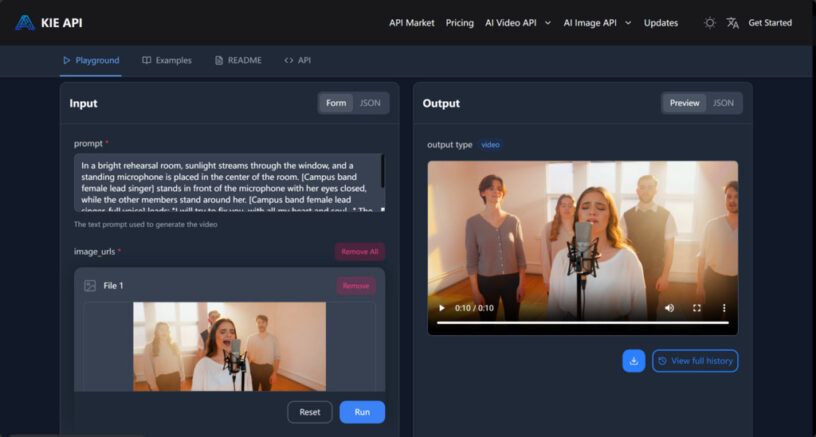
The Kling Text to Video API is optimized for use cases in which the main input is natural language. Interpretations of complicated instruction up to 1,000 characters long, providing granular lighting control, camera angles and movement. It is one of the major points that developers can rely on when creating professional apps where visual precision is essential.
Native audio-visual synchronization is one of the critical capabilities. In the case of automated news explainers and virtual tutors, this perfect alignment between speech and lip-sync and environmental acoustics is essential. The developers can do this synchronization within the API so that there is no need for an external post production tool. The duration and the number of frames can be set in the request to fit the technical requirements of the target platform.
Learn how to use the Kling Image to Video API to create videos from images
Get a working knowledge of the Kling Image to Video API
When it comes to converting static visuals into video, the Kling Image to Video API is the preferred solution. This is especially helpful when developing based on a product blueprint or architectural rendering. The API can receive a high-resolution image (up to 10MB) and transform it into a dynamic 10 second simulation.
In this process, the developer gives a static picture and also motion descriptors which dictate the movement of the camera, e.g. cinematic pans or focus pulls. The Kling 2.6 API gives a consistent look between the frames—maintaining the integrity of the original asset and introducing professional grade motion to the video. A necessary API for technical demonstrations in which the clarity of the image should be maintained.
Reduce the cost of monitoring and scalability in architectural efficiency
Any strong integration should take into consideration the operational health and cost-efficiency. Developers are advised to use Common API for real-time resource tracking and alerts about their usage. In addition, the Kling 2.6 API doc contains status codes to be mapped into the application’s error handling logic in order to properly handle instances such as rate limiting and credit depletion.
When scaling an automated pipeline, it’s important to understand the Kling 2.6 API price tiers. The fees are based on the following:
- 5 seconds silent: $0.28
- 10 seconds silent: $0.55
- 5 seconds sound: $0.55
- 10 seconds sound: $1.10
Financial transparency allows developers to work out their request logic, depending on the needs of the end user, and not lose sight of the return on investment.
Conclusion
The Kling 2.6 API’s inclusion in custom workflows marks a step towards a more automated and efficient media production. This approach puts video generation in a programmable world, allowing organisations to increase their visual content without adding to the operational overhead.










Leave a Reply