Platforms can link accounts that share the same device, browser, or connection. Multi-account tools solve this by giving each account its own separate environment.
Running multiple accounts for e-commerce or social media marketing? Keeping each one separate and organized is what lets the operation scale.
This review breaks down Multilogin vs Incogniton. Multilogin is a cloud Android phone platform for multi-account management, with browser profiles included, and Incogniton is a browser-profile tool. We’ll walk through how they compare, so you can figure out which one works for managing multiple accounts.
How antidetect browsers work
Antidetect browsers control the digital fingerprint your browser sends to websites. This fingerprint includes data points like your operating system, installed fonts, screen resolution, graphics card rendering (WebGL, Canvas), and browser settings – plugins, language, timezone, and more.
Here’s what happens: the browser creates a separate profile for each account and gives it a different fingerprint. Each profile stays distinct, so websites see them as different users. This lets you manage multiple accounts without them getting linked or flagged.
The idea is straightforward – make each profile look like a different person on a different device. When done right, platforms can’t connect your accounts together.
Multilogin vs Incogniton: Overview
Multilogin and Incogniton both help you manage multiple accounts with separate profiles. Multilogin is a cloud Android phone platform that also includes browser profiles, while Incogniton is a browser-profile tool.
Multilogin makes things pretty straightforward from the start. It’s an all-in-one platform that bundles cloud Android phones, browser profiles, built-in proxy traffic, mobile minutes, and automation tools into one subscription. Everything you need is right there.
Incogniton takes a more bare-bones approach. You get the basic multi-account management features, but you’ll need to handle proxies and other technical setup yourself – it’s not as plug-and-play. Let’s compare Multilogin and Incogniton in detail to see which is best for your business.
Feature-by-feature comparison: Multilogin vs Incogniton
Both tools do the job, but they work quite differently. Let’s see how they actually stack up.
1. Multilogin vs Incogniton: User interface (UI and ease of use)
When you’re just starting out, you need an interface that doesn’t make things harder than they should be. The interface shouldn’t add extra frustration to your workflow.
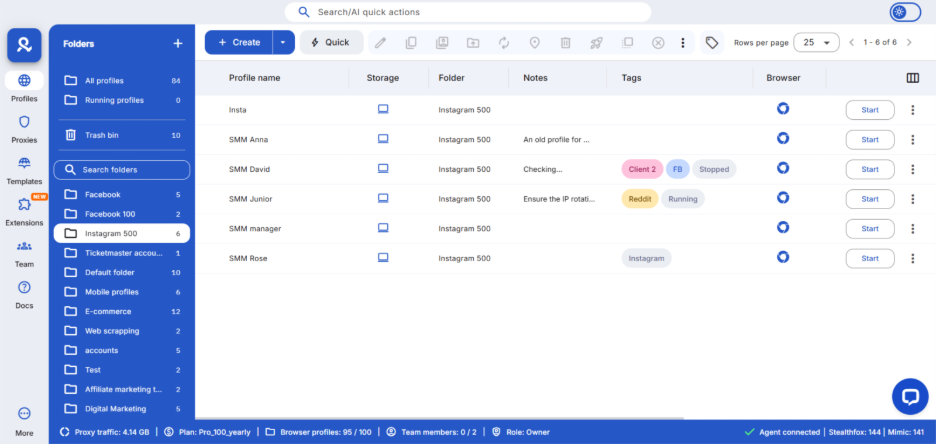
- Multilogin: Multilogin brings cloud phones and browser profiles into one dashboard. You get a live view of running profiles, plus custom columns, color tags, and notes to keep larger setups organized. New to multi-account tools? Multilogin won’t bury you in settings, and it keeps complex operations straightforward.
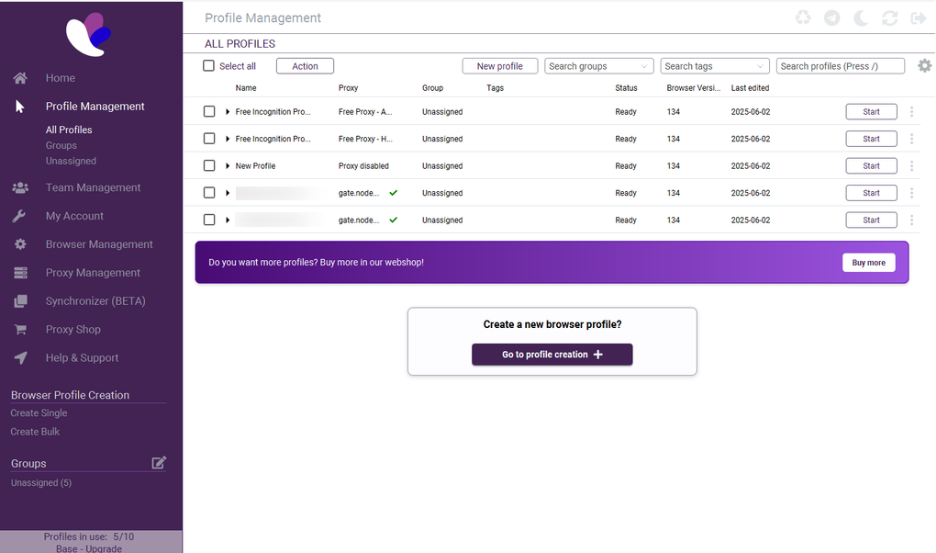
- Incogniton: Incogniton takes a no-nonsense approach with a simple interface. Finding what you need doesn’t require digging through confusing menus. The core profile management tools are easy to access, and there’s not much of a learning curve. It’s a solid pick if you want something you can figure out quickly.
2. Proxy integration: All-in-one simplicity vs. DIY setup
Proxy handling is often the biggest pain point for beginners, and it’s critical because proxies give each profile its own IP address.
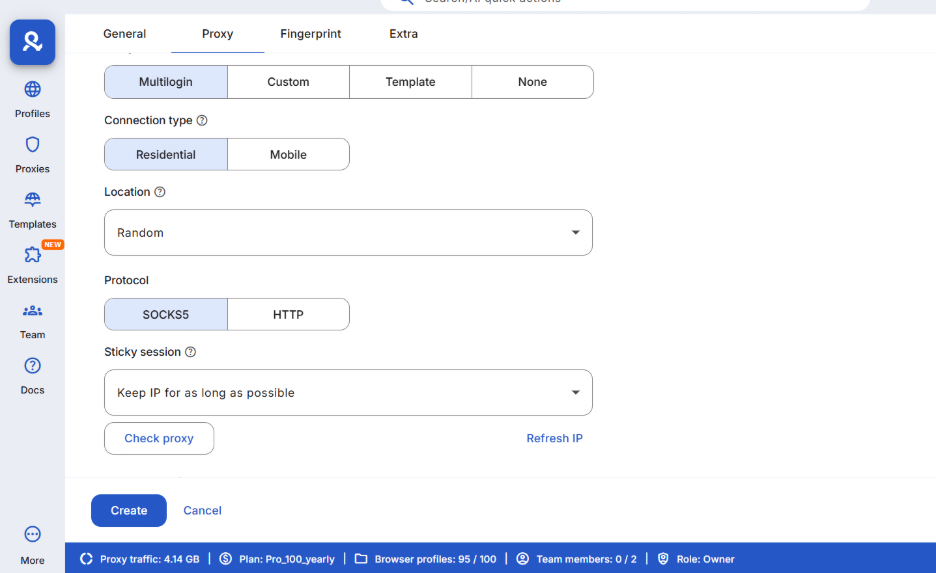
- Multilogin: Every plan includes built-in residential and mobile proxies matched to 150+ locations, and each profile gets its own IP and matched geolocation. Third-party proxies over HTTP, HTTPS, ISP, and SOCKS5 also work. You don’t need to find a proxy provider or configure anything to start, because the proxies are integrated into the platform. That removes one separate tool and bill from the setup.
- Incogniton does not provide built-in proxies. While it supports HTTP, HTTPS, and SOCKS5 proxies, you still need to find a proxy provider, pay for it separately, and configure it yourself. This means managing two services instead of one, which adds complexity and extra costs.
3. Account isolation and platform support
The core value of these tools is keeping each account properly separated across the platforms you use.
- Multilogin: Multilogin was founded in 2015. It offers real Android devices in the cloud for native mobile apps like TikTok and Instagram, alongside browser profiles for web-based platforms, which covers more ground than browser-only tools. One limit to know: Multilogin cloud phones can’t receive SMS or calls, so verification codes need your own number or an external SMS provider, and cloud phones need a reliable internet connection.
- Incogniton: Incogniton uses its own fingerprinting tech and works well for most use cases. It passes standard detection checks without issues. That said, Multilogin adds real Android devices in the cloud for mobile-first platforms such as TikTok and Instagram, which browser-only tools do not cover.
4. Automation & Scaling
You might start managing accounts manually, but as you grow, automation becomes necessary.
Multilogin: Multilogin offers a documented API and works with automation tools like Selenium, Puppeteer, Playwright, and Postman. Cloud phones also support full ADB access, so automation tools and AI agents can open apps and run flows on them.
Incogniton: Incogniton supports the standard automation frameworks (Selenium, Puppeteer, Playwright). It gets the job done. If you want to automate, you’ll need to set it up yourself or have some technical knowledge.
5. Support and customer success
When things go wrong, quick and reliable support is essential.
- Multilogin: Multilogin provides 24/7 support in five languages.
- Incogniton: Incogniton provides email and Telegram‑based support during office hours (CET). They do not offer 24/7 multilingual live support, which can be a consideration for users operating across multiple time zones.
6. Browser flexibility and platform support
Running multiple accounts often requires different environments.
Multilogin: Supports Windows, MacOS, Linux, multiple browser engines (Chromium, Firefox), and cloud Android phones.
Incogniton: Focuses on Chromium-based profiles and supports Windows, MacOS, with limited Linux support. It offers local and cloud storage, but no mobile emulation and no Firefox support.
Verdict: Multilogin provides broader browser flexibility and adds cloud Android phones.
Multilogin vs Incogniton: Counting costs
The true cost of a multi-account tool must include the price of the proxy service it needs.
When comparing the starting paid tiers, Multilogin’s all-in-one value becomes clear.
| Feature | Incogniton (Starting paid plan) | Multilogin (Starting paid plan) |
| Profiles | 10 Profiles | 5 profiles free; 10+ on paid tiers |
| Price (Monthly) | ~$19.99/month | Free plan with no time limit; paid plans from $7.08 per month |
| Proxy traffic | Not included (Must buy separately) | Built-in proxy traffic Included |
| Team seats | Limited | Available on paid plans |
Incogniton’s starting price is higher and does not include proxies. For a beginner, adding the cost of a reliable residential proxy service makes Incogniton significantly more expensive than the Multilogin Pro plan. Multilogin offers a free plan with no time limit and no credit card needed. The free plan’s proxy traffic and mobile minutes are one-time, and free profiles are deleted after 7 days of inactivity. Paid plans start from $7.08 per month and include monthly proxy traffic and mobile minutes.
Verdict: Multilogin’s bundled pricing covers cloud phones, browser profiles, built-in proxy traffic, and mobile minutes in one subscription, which makes total cost easier to compare and removes the need to run a second tool.
Final verdict
The choice between Multilogin and Incogniton comes down to how you want to work.
Multilogin is the better fit if you want an all-in-one platform without the headaches. It is the only platform that includes cloud phones, browser profiles, residential proxies, and mobile minutes in every plan, plus a free plan with no time limit to start. You get one platform to scale your multi-account operation, with no need to juggle multiple services.
Incogniton works if you want a free tier and don’t mind managing your own proxy setup. You’ll need to be comfortable with the extra complexity and variable costs that come with sourcing proxies separately.