If you’ve ever written documentation, you’ve probably thought about how much better it would land as video. Technical concepts that require three paragraphs to explain adequately often make sense in 60 seconds of narrated screen walkthrough. The problem is that producing that video manually adds an hour of overhead per concept — recording, editing, adding captions, rendering, uploading. The math gets ugly fast.
I’ve been thinking about this from a developer’s perspective: what’s the minimum viable path from structured text to publishable video? The answer involves AI tools, but maybe not the way you’d assume.
The problem with existing documentation-to-video Workflows
The tools developers already have for documentation (Markdown, Docusaurus, Notion, Confluence) don’t have native video output. The standard workaround is screen recording: someone narrates through the documentation while a recording tool captures it.
This works, but it breaks at scale. If you’re maintaining a developer portal with 40+ concept guides, you’re not going to re-record every time there’s an API update. The video library becomes stale within weeks of the initial publish.
The other approach — hiring a content production team or working with a video agency — solves the quality problem but not the maintenance problem. A $3,000 explainer video is obsolete the moment the underlying API changes.
What you actually need is a process that generates video from structured content and is cheap enough to run on every update cycle. That’s a different requirement from “produce a great one-time video,” and it points toward AI generation rather than traditional production.
How AI lecture video generation works
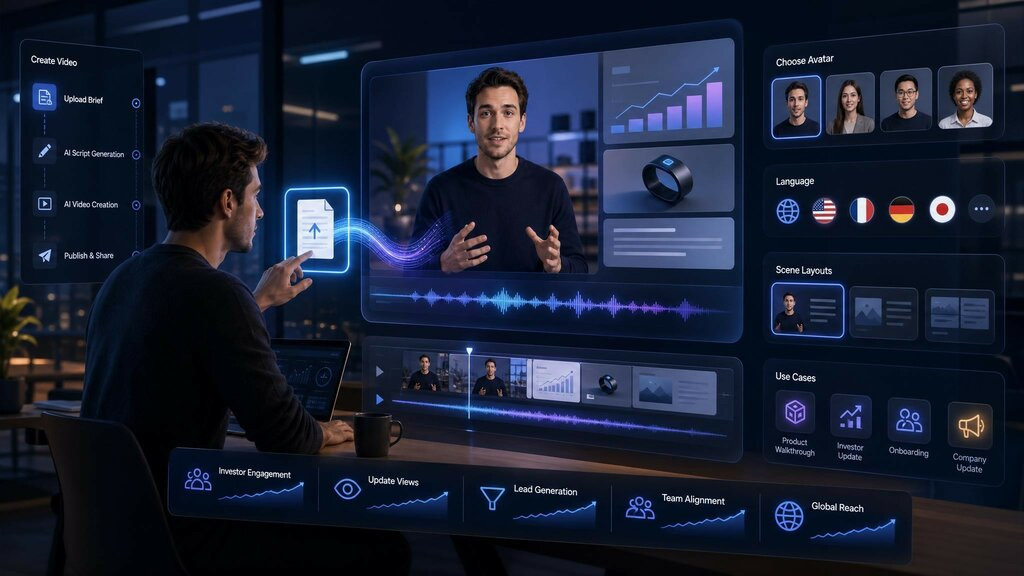
The basic workflow is this: you provide a text input (a script, a Markdown document, a set of bullet points) and the system generates a narrated video. The presentation is handled by an AI avatar — a realistic digital presenter — who reads the content while scene layouts, on-screen text, and visual transitions are handled automatically.
An AI lecture video maker built for educational contexts handles a few things that generic AI video tools don’t: structured multi-section output that mirrors a course module format, technical terminology pronunciation that doesn’t mangle domain-specific terms, and caption generation suitable for accessibility compliance.
For a developer building educational content, the useful features are:
- Document input formats: Upload a PDF, paste Markdown, or input a script directly. The system structures it into scenes automatically.
- Avatar and voice selection: Choose a presenter style appropriate for technical content (clear, neutral, professional).
- Language support: Generate the same lecture in multiple languages from the same source document — useful if your documentation audience is international.
- Export format: Standard MP4 at 1080p, compatible with every LMS and documentation platform.
Where this fits in a technical documentation stack
This format is best suited for conceptual content — the “why and what” of a system — rather than interactive walkthroughs where the user needs to follow along. Some concrete use cases:
Architecture overviews. Your README explains what the service does. A 90-second video explains it in a way that someone unfamiliar with the codebase can absorb immediately. Drop it at the top of your internal docs and watch the “how does this work?” Slack questions decrease.
Changelog summaries. Most changelogs are text walls. A two-minute video per major release explaining what changed, why it changed, and what it means for existing integrations is dramatically more useful. With AI generation, this is a 20-minute task per release, not a 4-hour production.
Onboarding sequences for API consumers. External developers integrating with your API often stall at authentication, rate limiting, and error handling. A three-part video series covering exactly those topics, generated from your existing authentication documentation, reduces support tickets measurably.
Internal knowledge transfer. When a senior engineer documents a system, that documentation usually dies on a Confluence page. If the same documentation becomes a 10-minute video lecture, it gets watched. Knowledge transfer happens.
Limitations worth being honest about
The output of AI lecture generation isn’t appropriate for every context. Highly interactive content — coding tutorials where the viewer needs to pause and try things, step-by-step CLI walkthroughs — still works better as screen recording. The AI presenter format is for declarative knowledge, not procedural instruction.
Voice quality has improved significantly but isn’t indistinguishable from a skilled human presenter. For internal documentation, this is a non-issue. For customer-facing technical content on a major commercial platform, you may want to layer AI-generated drafts with human review.
Customization has limits. If your brand requires very specific visual styles or animation patterns, current AI tools won’t match what a production team would deliver. They work within the framework of their preset layouts.
The practical starting point
Pick one section of your documentation that generates repeated questions. Generate a video lecture from that section using a free-tier trial. Embed it in your docs and observe whether the related support questions decrease over the following two weeks.
That’s a small enough experiment to run without committing significant time, and the signal will be clear. Technical documentation teams that have run this test consistently report that video reduces inbound questions on the specific concepts covered.